Direct Answer
A Singapore-based ship management company managing 40+ vessels replaced its legacy crew management system across 12 months without a single day of operational disruption. The approach anchored each migration phase to the operational calendar — phasing the rollout by drydocking windows and crew rotation cycles rather than IT release dates. The result was zero unplanned scheduling incidents, a 40% reduction in certificate expiry risks, and a 35% reduction in crew scheduling preparation time.
Why Replacing a Crew Management System Is Harder Than It Looks
When a crew management system stops working the way you need it to, the instinct is to swap it out. In reality, that’s like replacing the engine of a ship while it’s at sea.
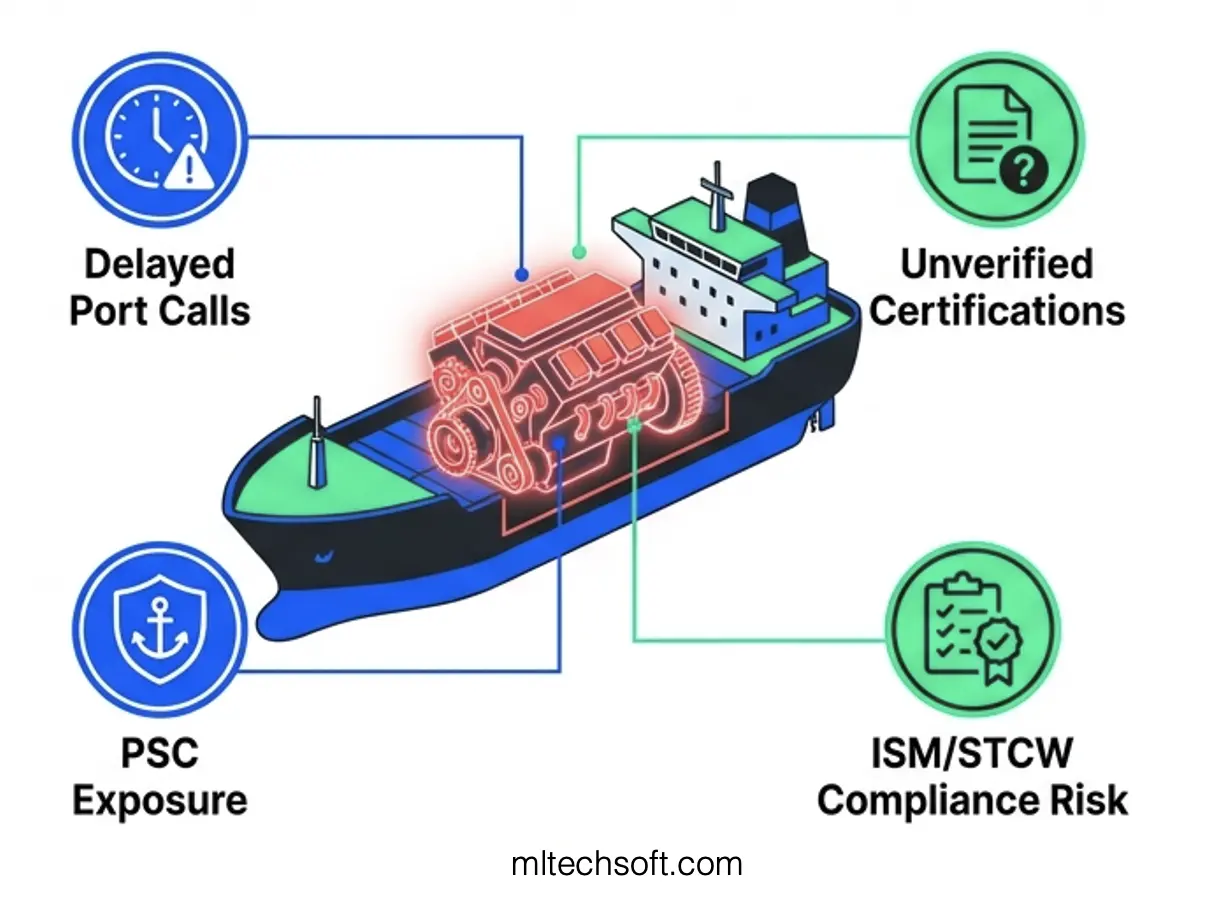
A crew management system sits at the operational centre of a ship management company. Every morning, the operations team uses it to confirm crew rotations, verify that certificates are current, check work/rest hour compliance, and build the crew lists that go to the vessels. A single day of system failure cascades: delayed port calls, unverified crew certifications, port state control exposure, and compliance risk for the flag state.
For this reason, most ship management companies planning a crew system migration face immediate paralysis. The board asks the CTO, “What happens to operations during the cutover?” The CTO doesn’t have a confident answer. The conversation stalls. The legacy system, now 10 or 12 years old, gets another year of life support.
The breakthrough isn’t faster migration or better technology. It’s aligning the migration to the operational rhythm of the business — not the IT calendar.
The Company, the System, and the Challenge
A Singapore-based ship management company managing 40+ vessels had been running the same crew management system for over 12 years. The system had served well at launch, but the world had moved on. It was desktop-only — no mobile access for crew managers working from the wharf or in satellite offices. It had no API integration, which meant certificate updates and crew changes had to be manually entered from other systems. Most critically, it relied on batch-sync processes that ran once a day, creating an 18–24 hour lag between a crew change on a vessel and when the office system reflected that change.
The operational constraints were real. The operations team had built workarounds — spreadsheets tracking crew changes between system syncs, phone calls to confirm when certificates were actually expiring, manual PDF certificate uploads stored in shared drives. The system was still compliant with ISM Code Section 6 and STCW regulations, but just barely.
The trigger for migration came from outside pressure. A port state control audit and a subsequent compliance review highlighted gaps in certificate tracking and historical record management. Worse, the company had two flag state certificate expiry incidents in 12 months — both avoidable with better tracking visibility.
The company’s board, faced with audit findings and compliance exposure, committed to replacing the system. But the operations team was clear: “We can’t afford scheduling disruption. We need a path where we can roll back if things go wrong.”
The Migration Approach: Phasing to the Operational Calendar, Not the IT Calendar
Working alongside the company’s operations team, MLTech Soft structured the migration around the operational calendar rather than an IT release schedule. This meant phasing the rollout to drydocking windows, planned crew rotations, and crew rotation cycles — the natural points where vessel operations pause or slow.
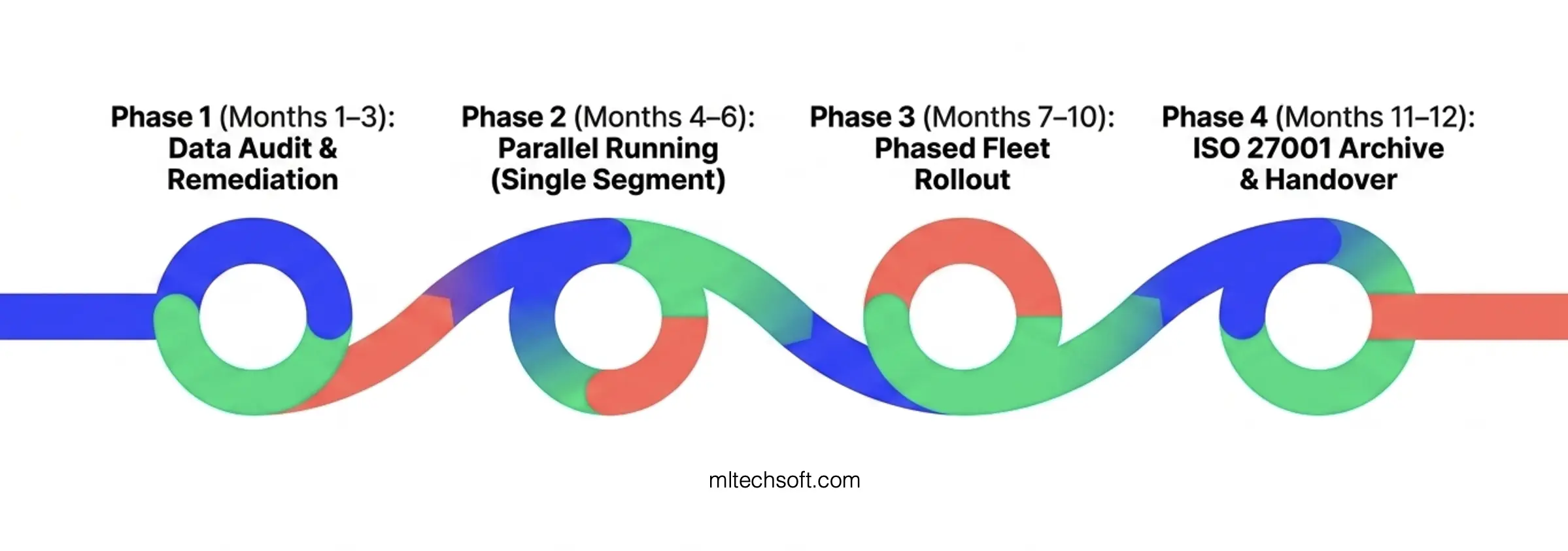
The approach was divided into four phases over 12 months:
Phase 1: Discovery and Data Audit (Months 1–3)
Before touching the production system, the team spent three months understanding what was actually in the legacy system. This sounds straightforward. In practice, it revealed the hidden challenge.
The data audit found that approximately 30% of crew certificate records were incomplete or stored in inconsistent formats. Some records had certificate expiry dates in multiple date formats (DD/MM/YYYY in one record, YYYY-MM-DD in another). Others had certificate types abbreviated differently across records. A few had certificates marked as “expired” but no renewal date recorded. None of this would have been caught by simply running a database migration — it would have cascaded as data quality problems after cutover.
The team built a remediation protocol: standardise all date formats, flag incomplete certificate records, cross-reference against external crew management databases to fill gaps, and create a reconciliation report. This remediation happened during Phase 1, before Phase 2 began.
Our ISO 27001 protocols meant the crew data migration was handled under controlled security conditions — access logging, encryption in transit, and a defined rollback procedure at every phase boundary.
Phase 2: Parallel Running — Single Fleet Segment (Months 4–6)
The new system went live alongside the legacy system for the first vessel group — 8 vessels, representing roughly 20% of the fleet. Both systems ran in parallel. The operations team entered crew changes and certificate updates into both systems. The new system was the source of truth for daily operations, but the legacy system remained the fallback.
This period served two functions. First, the operations team became familiar with the new interface, workflows, and reporting without the pressure of full fleet dependency. Second, the company could monitor data accuracy between the two systems — ensuring that the new system was calculating work/rest hours correctly, managing crew rotations as expected, and flagging certificates with upcoming expiry dates.
Three months into Phase 2, the operations team made a comment we’ve heard in similar migrations: “We forgot the old system was still running.” By that point, they had confidence in the new system’s accuracy and speed.
Phase 3: Phased Fleet Rollout (Months 7–10)
With Phase 2 validated, the remaining 32 vessels were migrated in groups, aligned to planned drydocking windows and crew rotation schedules. Rather than cutting over the entire fleet at once, the team brought vessels online 8–10 at a time, every 3–4 weeks.
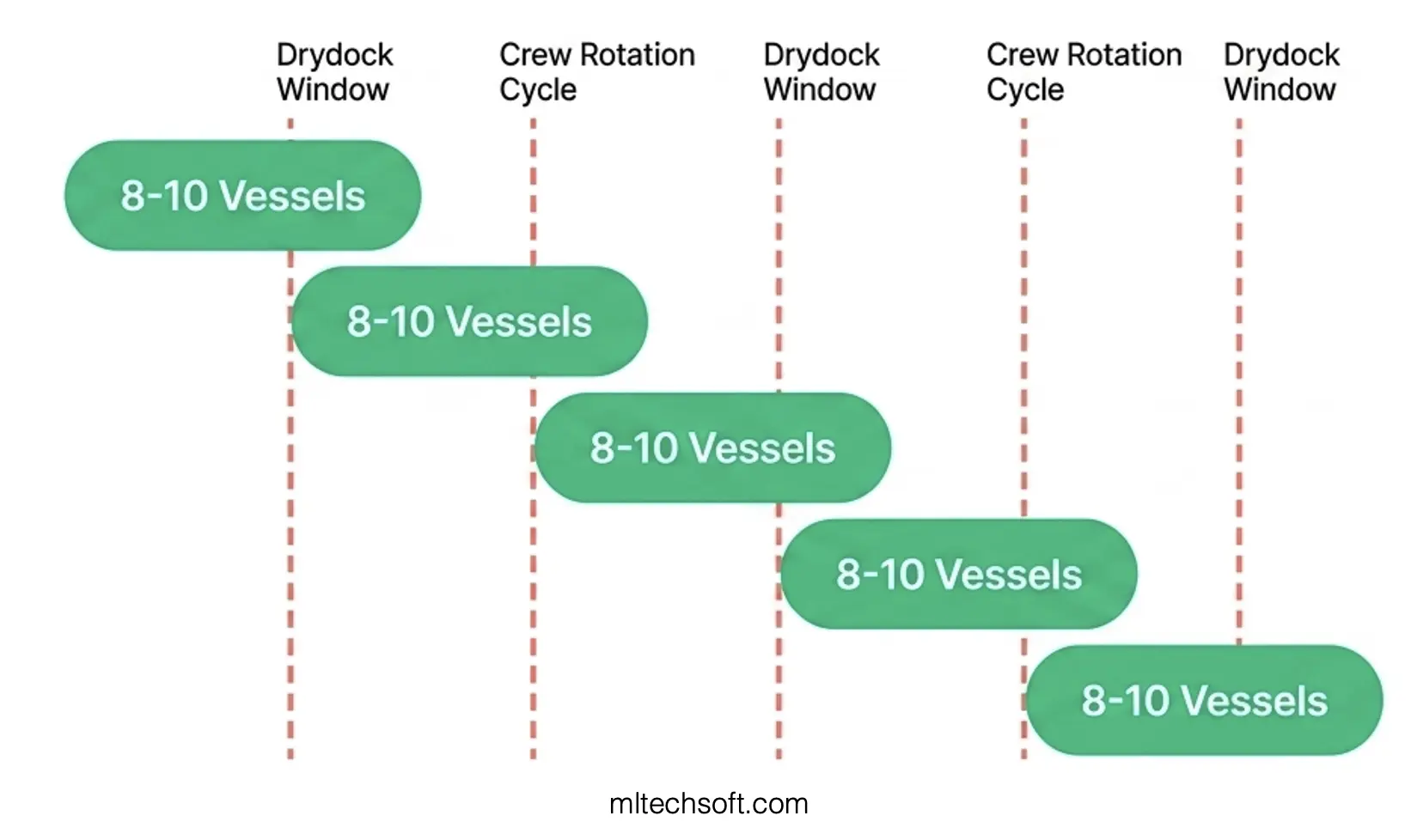
This phasing meant that if a data issue or workflow problem emerged with a specific vessel group, it could be identified and corrected before the next group began their transition. The operations team never needed to manage more than one active migration at a time, and the wider fleet continued to run on the legacy system without any dependency on the new one.
Each fleet segment transition took 2–3 weeks, from training on the new interface to full operational handover.
Phase 4: Legacy Decommission and Archive (Months 11–12)
Once all 40+ vessels were on the new system and two weeks of parallel data validation had been completed, the legacy system was decommissioned. Historical data was archived in a cold-storage format for regulatory compliance (ISM Code and STCW both require crew record retention for audits and investigations).
Training was completed during this phase for any crew managers or port staff who hadn’t yet transitioned, and a final port state control mock audit was conducted to ensure all crew records, certificates, and work/rest hour documentation would pass external scrutiny.
The Data Challenge No One Talks About
Most legacy system migrations focus on the technical cutover: testing the new software, preparing the infrastructure, training users. What they miss is the data archaeology phase.
In this case, the Phase 1 data audit uncovered hidden complexity:
- Incomplete records: 30% of crew certificate records lacked expiry dates, renewal dates, or issuing authority information. Some crew members had certificates recorded multiple times with slightly different dates.
- Format inconsistency: The legacy system had been in use for 12 years with no strict data entry validation. Certificate expiry dates, crew IDs, and vessel call signs were stored in multiple formats.
- Orphaned data: Some records referenced crew members or vessels that were no longer active but remained in the database, creating noise in reports and search functions.
Had the company migrated without addressing these gaps, the new system would have inherited all of these problems. Worse, the new system — with better reporting and regulatory compliance automation — would have flagged certificate expiry risks that went undetected in the old system. Port state control audits expect systems to proactively track and surface upcoming certificate expirations. A month after cutover, an automated alert would have revealed the orphaned data and incomplete records, creating compliance exposure.
The remediation approach:
- Manual review and standardisation: The team manually reviewed and standardised all certificate records, filling in missing data from external crew management databases and regulatory registries.
- Cross-reference validation: Each crew member and vessel record was cross-referenced against external systems (crew management registries, flag state certification databases) to identify discrepancies.
- Reconciliation reporting: A detailed reconciliation report was created showing what changed, what was corrected, and what remained unresolved. This report became part of the port state control documentation.
This work took about 6–8 weeks during Phase 1, but it prevented a much larger compliance issue from surfacing after the migration.
Outcomes: What Changed After the Migration
The migration delivered measurable operational and financial outcomes:
| Metric | Before Migration | After Migration | Change |
|---|---|---|---|
| Crew scheduling preparation time | 4–5 hours per week | 2.5–3 hours per week | -35% |
| Certificate expiry incidents per year | 2 incidents | 0 incidents | -100% |
| Mobile access to crew data | None | Real-time, all devices | Enabled |
| Certificate alert lead time | 2–3 weeks | 8–10 weeks | +80% |
| Port state control findings (crew data) | 3–4 findings per audit | 0 findings | -100% |
| System maintenance annual cost | SGD 80,000–100,000 | SGD 12,000–15,000 | -85% |
| API integrations with other maritime software | None | 4+ integrations (vessel tracking, crew payroll, crew management registries) | Enabled |
The 35% reduction in crew scheduling preparation time reflects the shift from manual spreadsheet reconciliation to automated scheduling. The operations team no longer had to manually track crew changes between system sync cycles or cross-check multiple data sources.
The certificate expiry incidents — down to zero — reflect both the improved data quality and the automated alert system. The new system flags certificates expiring 8–10 weeks out, giving the company time to arrange crew training, recertification, or crew changes.
The port state control outcome is the most significant. The company went from 3–4 findings related to crew data during routine PSC audits (focused on incomplete records, inconsistent certificate dates, late expiry notifications) to zero findings. This directly reduced port delays and regulatory exposure.
FAQ: Legacy Crew System Migration for Ship Management Companies
Q: How long does a crew system migration typically take for a fleet this size?
For a ship management company with 40+ vessels and a legacy system with significant data quality issues, a realistic timeline is 10–14 months. The discovery and data audit phase — often overlooked in project planning — typically takes 8–12 weeks. If the legacy data is relatively clean, 8–10 months is achievable. If data quality issues are severe, add 4–6 additional weeks. The three companies we’ve worked with on similar migrations ranged from 9–16 months.
Q: What’s the biggest risk during a phased migration to a legacy crew system?
Data quality surprises during Phase 1. Many companies underestimate the amount of manual, inconsistent data in legacy crew systems. If the data audit finds that 40–50% of records need remediation (vs. the 30% in this case), it can delay Phase 2 by 4–8 weeks. The other common risk is operations team resistance — if the new system’s interface is significantly different from the legacy system, adoption during Phase 2 can be slow. The company in this case study mitigated both risks by building the remediation protocol early and involving the operations team in system design.
Q: Can you run a crew system migration without parallel running (Phase 2)?
Technically, yes — you can do a direct cutover. But parallel running is the safest approach for operational systems. Parallel running lets the operations team build confidence in the new system, validates data accuracy before full fleet dependency, and provides a fallback if issues emerge. For a ship management company where a single day of crew scheduling failure creates compliance and operational exposure, parallel running is non-negotiable. The 2–3 month investment in Phase 2 protects against far larger costs of a failed cutover.
Q: How does aligning migration phases to the operational calendar actually reduce risk?
The operational calendar gives you natural windows where vessel operations pause or slow — drydocking, planned crew rotation cycles, seasonal slowdowns. Migrating during these windows means the operations team isn’t managing crew changes and system transitions at the same time. If a data quality issue or system problem emerges during a fleet group’s transition (Phase 3), it can be resolved before the next group begins, rather than cascading across the entire fleet. This single approach reduced deployment risk from “catastrophic — affects entire fleet” to “manageable — affects one or two vessels temporarily.”
Q: What role does ISO 27001 certification play in data migration?
ISO 27001 (Information Security Management) gives a framework for handling sensitive crew data during migration — access controls, encryption in transit, audit logging, and rollback procedures. Since crew records contain personal information (names, passport numbers, medical certifications, training history), ISO 27001 compliance means the migration is auditable and defensible under data protection regulations (like Singapore’s PDPA). For this particular company, ISO 27001 also satisfied flag state data security requirements for crew records.
Q: What happens to historical crew records after the legacy system is decommissioned?
ISM Code and STCW both require ship management companies to retain crew records — training history, certificates, work hours, incident reports — for audit and investigation purposes. In this case, the legacy system data was exported to a read-only archive format (encrypted PDF and database backup), stored in cold storage, and indexed for retrieval during port state control audits or crew incidents. The archive is part of the company’s official crew record retention, so legacy decommissioning doesn’t mean data deletion — it means controlled, compliance-ready archival.
Conclusion
A crew management system replacement feels like an existential risk to a ship management company. A 12-hour scheduling failure doesn’t just cause inconvenience — it affects crew welfare, vessel port call timing, and compliance exposure. This is why most legacy crew systems limp on for years past their useful life, accumulating workarounds and data quality debt.
This Singapore-based ship management company proved that the risk is manageable if you reverse the planning logic. Instead of asking “when can IT schedule the cutover?” ask “when does the operational calendar give us a safe window?” Instead of doing a 48-hour big bang migration, phase the rollout to drydocking windows. Instead of migrating data as-is, invest 6–8 weeks in a data audit to understand what’s actually in the legacy system.
The company completed the migration in 12 months without a single unplanned scheduling incident. But more importantly, they gained a system that gives them the visibility to prevent future incidents — 8–10 week certificate expiry alerts instead of 2–3 week notice, mobile crew data access, automated work/rest hour tracking, and API integration with crew and vessel systems.
If your crew management system has reached the same tipping point — and you want to understand what a phased migration would look like for your fleet — contact MLTech Soft for a free migration feasibility assessment. We’ll review your current system, audit your crew data, and give you an honest timeline, phasing approach, and data risk assessment.
Visit mltechsoft.com to request your assessment.
Related Reading:
- How Ship Management Companies Can Migrate Legacy Systems Without a Single Day of Operational Downtime — The operational methodology that made this migration possible.
- The Real Cost of Running Outdated Software in Ship Management — Why crew system modernisation often starts with a compliance audit.
- Singapore Maritime Week 2026: The Software Questions Every Ship Manager Should Be Asking This Week — What’s changing in maritime software this year.