
A custom system can run every day without a single complaint and still sit on software that stopped receiving security fixes years ago. That is the real story behind .NET 8 end of support. Microsoft stops issuing security updates for .NET 8 and .NET 9 on 10 November 2026, and the fix for a well-maintained application is usually a planned upgrade to .NET 10. For many older custom applications in Singapore, the bigger exposure is elsewhere in the stack: in runtimes, databases and servers whose support has already ended or ends on 12 January 2027.
What happens at .NET 8 end of support on 10 November 2026?
Nothing visible happens on 10 November: the application keeps running, and from that day any newly found vulnerability in .NET 8 or .NET 9 stays unpatched. Microsoft announced on 29 June 2026 that both versions reach end of support on the same day. .NET 9 is a Standard Term Support release whose support was extended from 18 to 24 months, which moved its end date onto .NET 8’s.
.NET 8 is a Long Term Support release with 36 months of support from its launch in November 2023. Microsoft’s recommended path is .NET 10, the current Long Term Support release, supported until 14 November 2028. Its upgrade guidance starts with changing the project’s target framework to net10.0 and updating the build and hosting environments.
For an application with an active team, current dependencies and automated tests, that upgrade is normally planned work, not a crisis. The trade-off is honest: it still needs testing and a release window, and every third-party package the application uses must support .NET 10.
Why is .NET 8 not the real problem for most older systems?
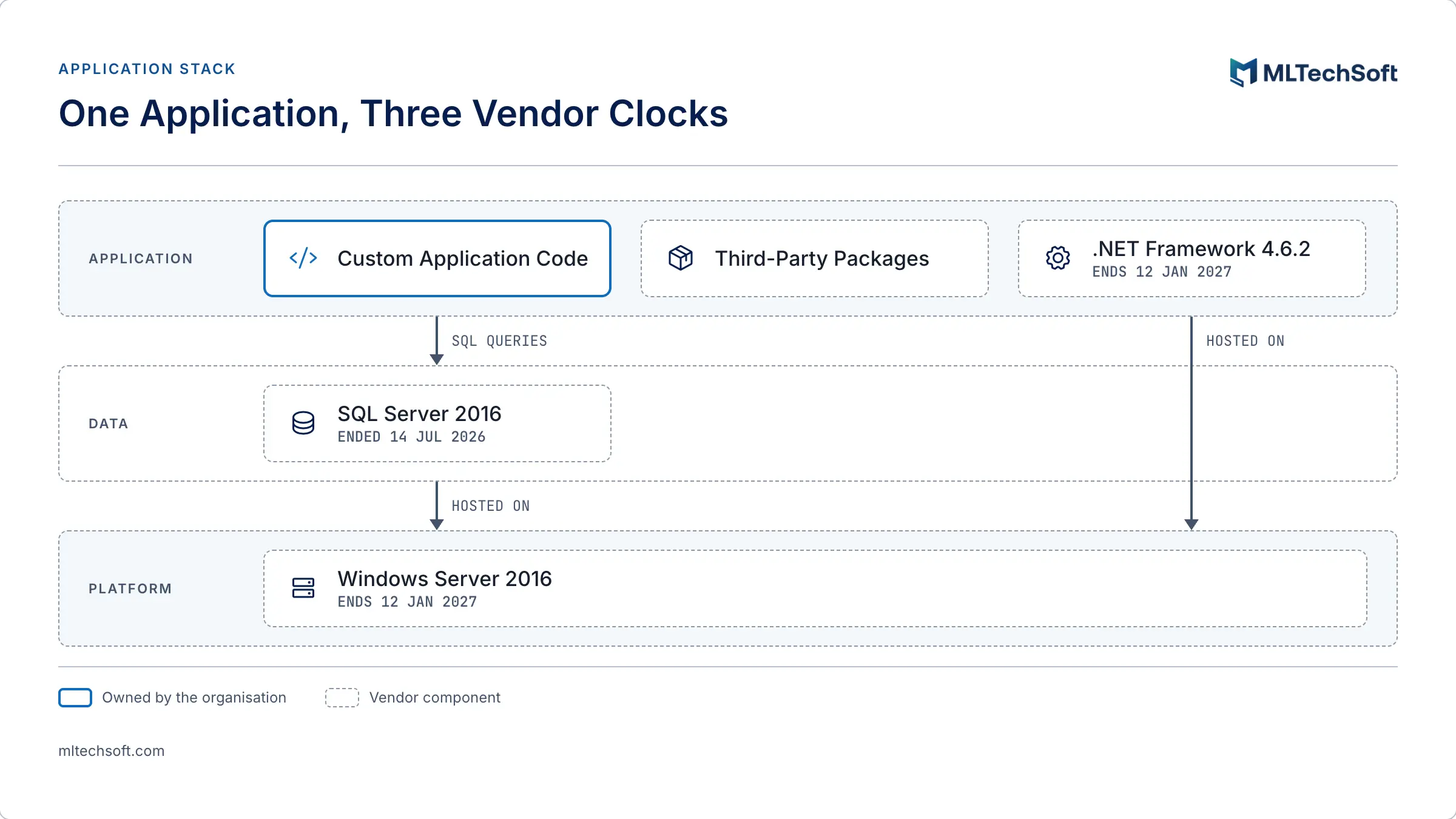
Because an application built on .NET 8 is at most three years old, while the systems most exposed to support deadlines are older and were built on earlier platforms. A custom application written in 2015 to 2020 typically runs on .NET Framework or an early .NET Core release, on a database and a server operating system bought at the same time. Each of those layers has its own vendor deadline, and several of them have already passed.
| Component | Support status | End of support |
|---|---|---|
| .NET Core 3.1 | Ended | 13 December 2022 |
| .NET Framework 4.5.2, 4.6, 4.6.1 | Ended | 26 April 2022 |
| .NET 6 | Ended | 12 November 2024 |
| SQL Server 2016 | Ended (paid Extended Security Updates available) | 14 July 2026 |
| .NET 8 and .NET 9 | Ending | 10 November 2026 |
| .NET Framework 4.6.2 | Ending | 12 January 2027 |
| Windows Server 2016 | Ending (paid Extended Security Updates available) | 12 January 2027 |
| .NET Framework 4.7 to 4.8.1 | Supported while installed on a supported version of Windows | Follows the Windows lifecycle |
Sources: Microsoft .NET and .NET Core support policy, .NET Framework lifecycle policy, and Microsoft Lifecycle pages for SQL Server 2016 and Windows Server 2016.
The .NET Framework row deserves a second look. Since version 4.5.2, Microsoft treats .NET Framework as a component of Windows, so it is supported only as long as the Windows version it runs on. An application on .NET Framework 4.8 hosted on Windows Server 2016 therefore loses support on 12 January 2027 with the server, even though 4.8 itself is a current version.
How do you find out what your application actually runs on?
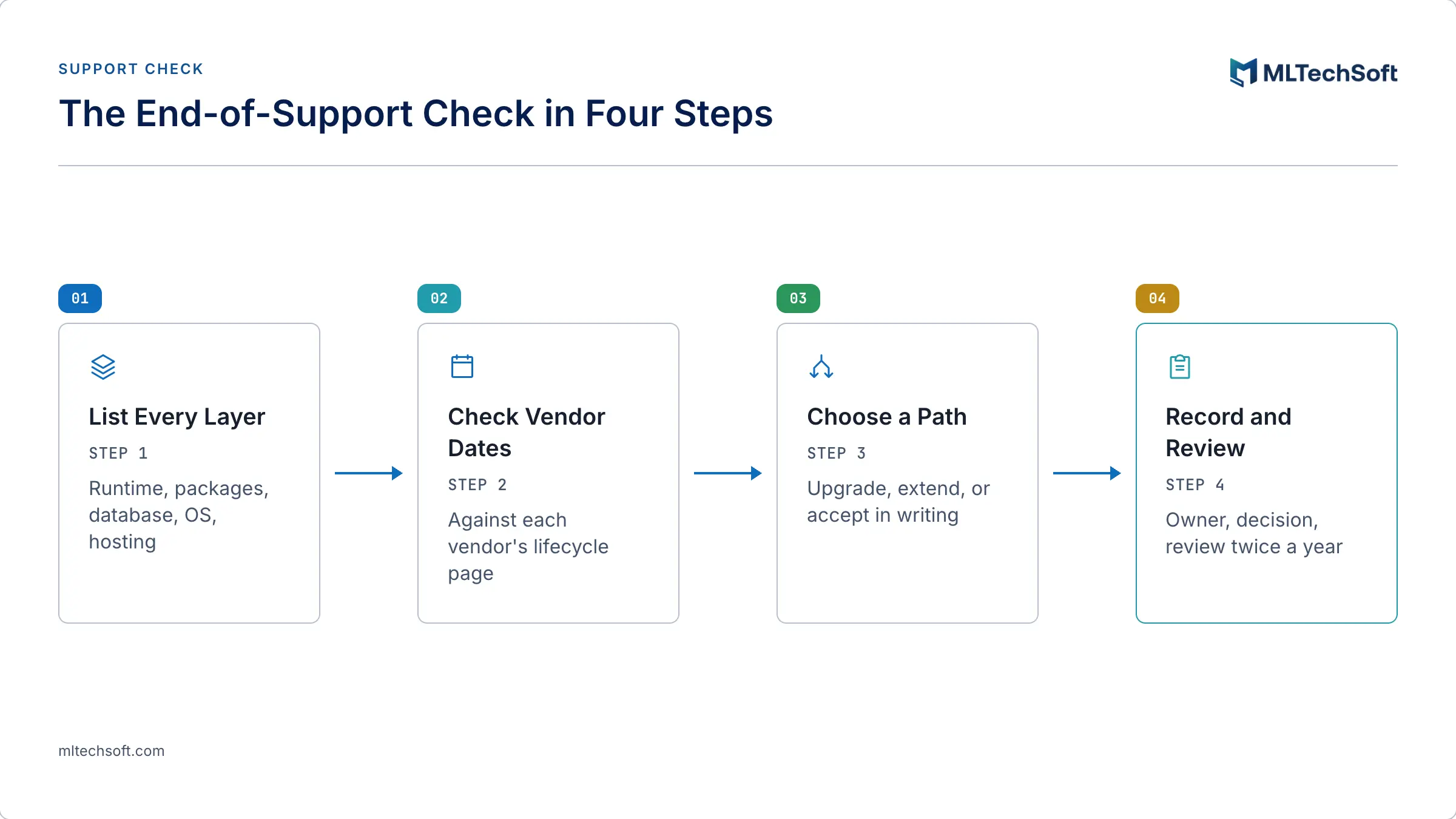
You list every layer under the application and check each one against its vendor’s lifecycle page. For a system with an active vendor, this is a short request. For a system whose original vendor has gone, or whose knowledge sits with one person, it is detective work, and it is worth doing before a deadline or a security review forces it.
The layers to cover:
- The runtime and its version. The project files show the target framework (for example
net48,netcoreapp3.1ornet8.0). If the source code isn’t to hand, the installed runtimes on the server are a starting point, not proof. - Third-party packages. Libraries pinned to old versions are a common reason an upgrade stalls: some have no release that supports the newer runtime.
- The database engine. The edition and version of SQL Server or any other database, including the servers used for reporting and integration.
- The operating system and hosting. The Windows Server version on each machine, physical or virtual, and whether it is on premises or with a cloud provider.
- Who can build and deploy it. Whether the source code, the build steps and the deployment credentials are held by the organisation, by a vendor, or by one engineer.
The last point is not a version number, but it decides how hard every other fix will be.
What are the options once a component is out of support?
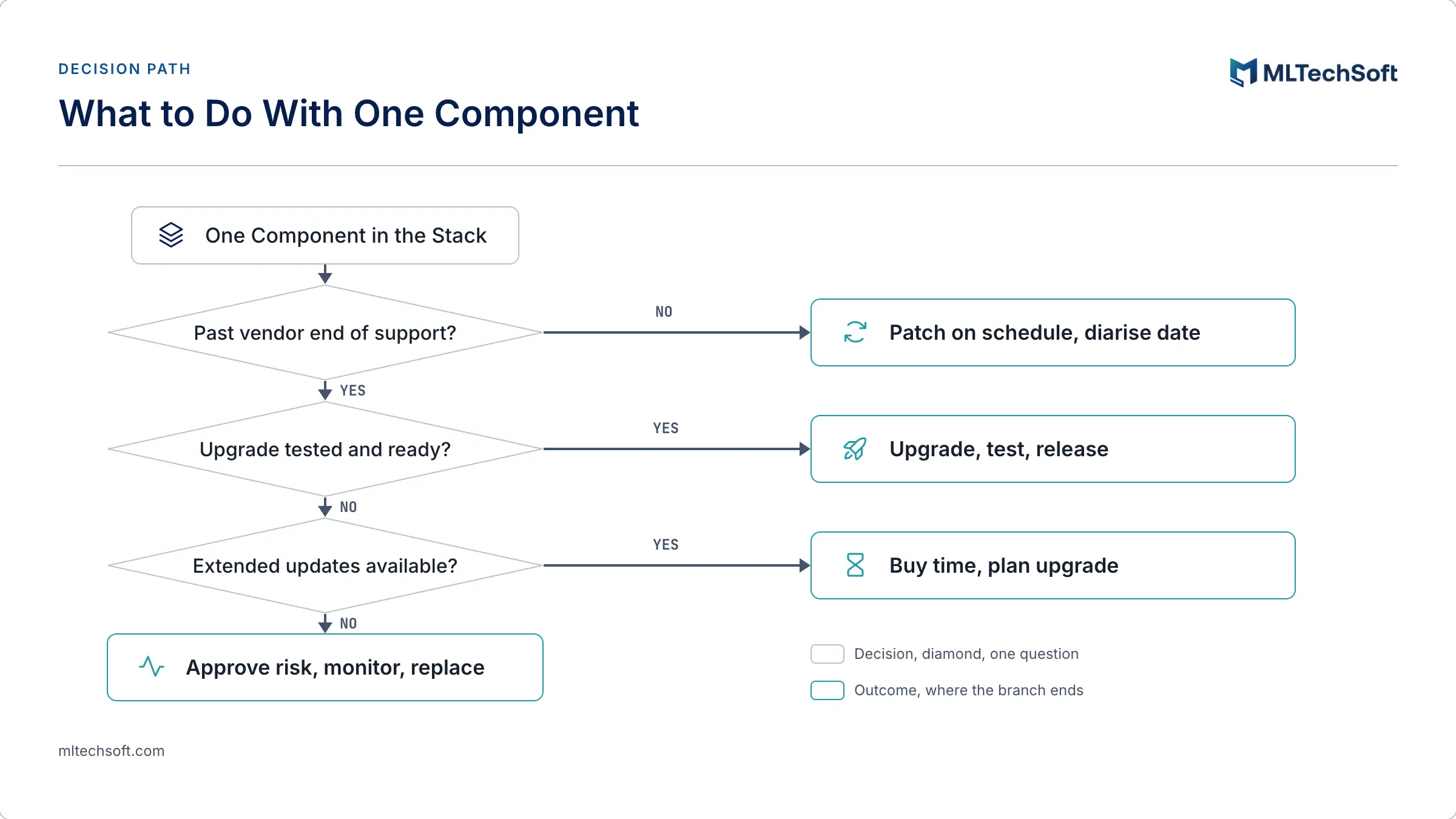
There are three honest options: upgrade the component, pay for extended security updates while an upgrade is planned, or keep running it with the risk formally assessed, approved and monitored. Which one fits depends on whether a tested upgrade path exists and whether the vendor still sells extended coverage.
Upgrade. Moving to a supported version is the only option that closes the gap for good. For the runtime, that means .NET 10 or, for .NET Framework applications, a supported Windows host. For the database and server, it means a newer SQL Server or Windows Server release.
Buy time with extended security updates. Microsoft sells Extended Security Updates for SQL Server 2016 in yearly terms running until 17 July 2029, and offers Extended Security Updates for Windows Server 2016 through Azure Arc. Some third-party vendors sell extended security support for out-of-support .NET versions. These keep security fixes flowing; they don’t remove the upgrade, they schedule it.
Accept the risk, in writing. Sometimes neither upgrade nor extended updates is possible in time. CSA’s Cyber Essentials mark (2022 edition, measure A.2) describes what that should look like: where an organisation continues to use assets past their end-of-support date, it must assess and understand the risk, obtain approval from senior management, and monitor the asset until it is replaced. A risk acceptance is a decision with an owner and a review date, not an absence of action.
Why will security reviews ask about this?
Because support status is now written into the standards Singapore organisations certify against and the vendor reviews they run. CSA’s Cyber Essentials mark expects the software asset inventory to record each asset’s end-of-support date, reviewed as good practice twice a year, and states that assets past end of support shall be replaced, with the approved risk exception above as the only alternative.
The same question reaches systems that are not regulated themselves. Under the updated Cybersecurity Code of Practice for Critical Information Infrastructure, existing CII owners must attain Cyber Trust mark certification at the Advocate tier by 31 December 2027. Their security teams increasingly ask the same of the systems that connect to theirs, and “anything past vendor support?” is one of the first questions on that list, as we set out in what Singapore’s new CII Cyber Code means for interconnected systems.
An organisation that can answer with a dated inventory and a recorded decision for each out-of-support component is in a very different position from one that has to find out during the review.
What makes an upgrade hard in a system nobody has touched for years?
Rarely the code change itself. The difficulty is everything around it: knowing how the system is built and deployed, which packages it depends on, how its data reaches other systems, and how to test that nothing broke. In an application that has run untouched for several years, that knowledge is usually incomplete, undocumented, or held by a vendor or an engineer who has moved on.
That is why an end-of-support deadline is better treated as a maintenance question than as a one-off upgrade project. Under a managed software maintenance arrangement, patch and version upgrades are routine, scheduled work: tested before release and reported after it. In the maintenance engagements we run, including the live systems we have maintained for PSA Marine for more than three years, an upgrade and update report goes to the client within three working days of every upgrade, and the project documentation is updated within three working days of any change.
When we take over a system we didn’t build, the first weeks of the onboarding phase are spent recovering exactly the knowledge an upgrade depends on: how the system actually behaves, how it is built and released, and what it connects to. Once that is written down, a support deadline becomes a line in the maintenance plan rather than a scramble.
Frequently asked questions
Will my .NET 8 application stop working on 10 November 2026? No. Microsoft has confirmed that applications built on .NET 8 or .NET 9 will continue to run after 10 November 2026. What stops is security updates and technical support, so any vulnerability found after that date remains unpatched.
Is .NET Framework 4.8 still supported? Yes, as long as it is installed on a supported version of Windows. Since version 4.5.2, .NET Framework follows the lifecycle of the Windows version it runs on, so an application on .NET Framework 4.8 hosted on Windows Server 2016 loses support when that server does, on 12 January 2027. .NET Framework 4.6.2 itself also ends on that date.
Can we pay for security updates after end of support? For some components, yes. Microsoft sells Extended Security Updates for SQL Server 2016 in yearly terms until 17 July 2029, and offers them for Windows Server 2016 through Azure Arc. Some third-party vendors offer extended security support for out-of-support .NET versions. These buy time to plan an upgrade; they don’t replace it.
What should we do first if we don’t know what our system runs on? Build an inventory of every layer: the runtime and its version, third-party packages, the database engine, the server operating system, and who holds the source code and deployment access. Then check each item against the vendor’s published lifecycle dates and record a decision for anything past or near its end of support.
If you’re not certain which of these dates applies to a system your operation depends on, a fixed-fee system health check is a low-risk way to find out. It gives you a full evaluation of the system with improvement options and a roadmap, and the assessment is yours whatever you decide next. Request a system health check for your custom application.