The conference room at a Singapore ship management company goes quiet when someone mentions system migration. The company runs 50+ vessels across four time zones, and their legacy crew management platform processes voyage records, certification updates, and compliance audits every hour. The CTO has delayed modernisation for three years. Not because the software is acceptable — it isn’t. But because the cost of downtime is unacceptable. A 4-hour outage during an active port call could cascade into hundreds of thousands of dollars in demurrage charges, regulatory fines, and operational chaos.
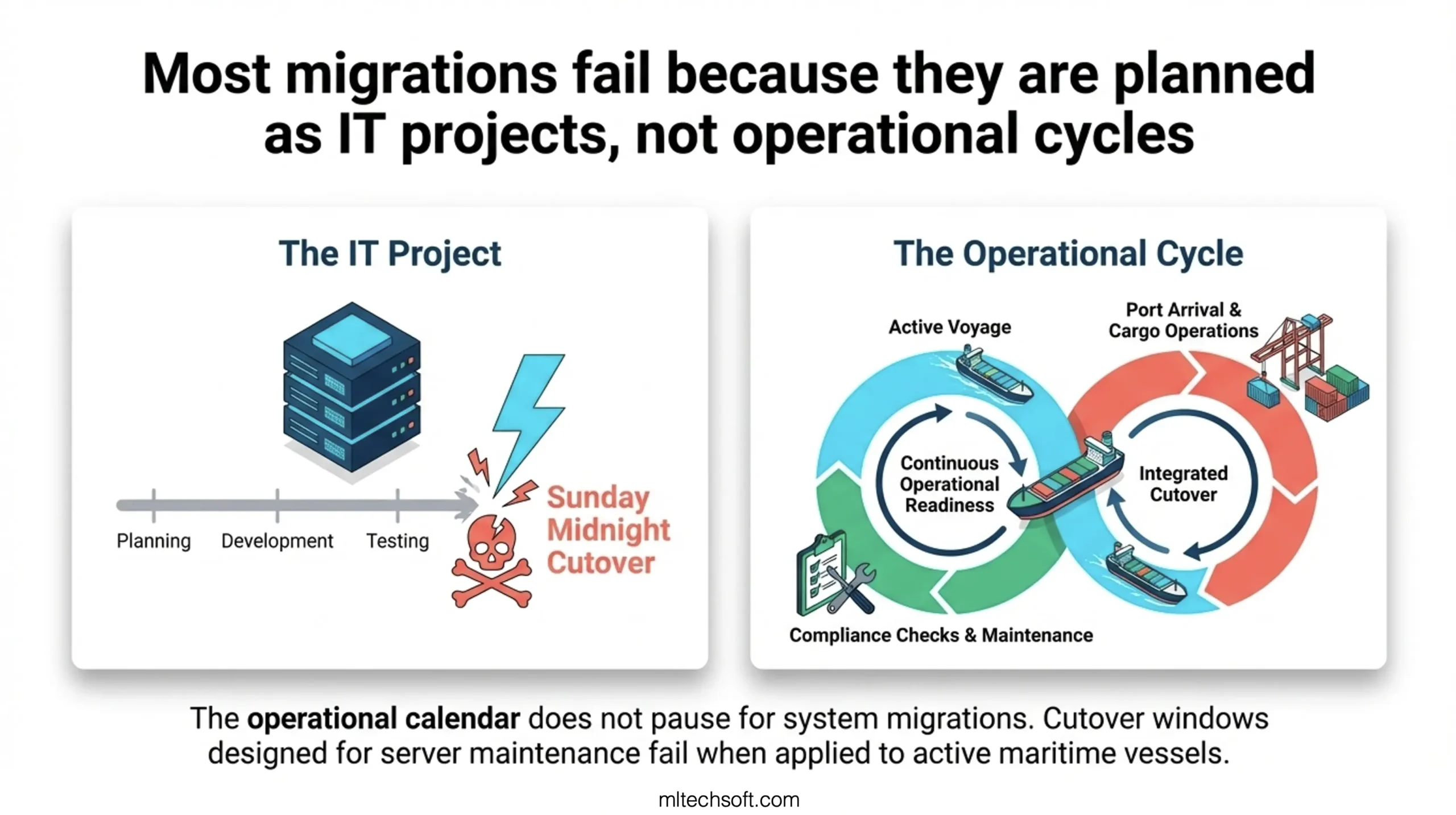
This paralysis is common. Most maritime software migrations fail because they’re planned like IT projects, not operational cycles.
Migrating a legacy ship management system without operational downtime is achievable when the migration is planned around the operational calendar rather than the IT calendar. The proven approach uses drydocking windows, port maintenance cycles, and crew rotation milestones as natural migration windows — periods when systems can be validated, modules handed over, and rollback protocols tested without affecting live vessel operations. The key technical components are a parallel-run architecture (old and new systems running simultaneously), phased module handover, and data integrity validation at each operational boundary.
This post walks you through exactly how this works, including a real case study of a Singapore ship manager who completed a full migration across four drydocking seasons with zero operational disruption.
Why Most Legacy Maritime System Migrations Fail (It’s Not a Technology Problem)
Most maritime software migrations fail because they’re planned like IT projects, not operational cycles. They schedule cutovers without accounting for active voyages, ignore the compliance calendar, and treat module validation as an IT checkpoint rather than an operational milestone.
Here’s what typically happens. The shipping company decides the legacy system is too expensive to maintain. They run an RFP, select a new vendor, and set a “go-live” date four months out. The IT team builds a detailed project plan with phases: System Design, UAT, Data Migration, Cutover. The date is set for a Sunday night, when traffic is low.
Then reality hits. The crew management module goes live at midnight. Within two hours, a ship in the Arabian Sea notices that crew change requests aren’t appearing in the system. The vessel has a crew member due to disembark at the next port call in six days. The legacy system is still running, but the two systems have diverged. Which one is correct? Nobody knows. The new system is rolled back. The company spends the next two weeks running both systems in parallel, manually reconciling data, and the project loses six months.
The technical problem was manageable. The operational problem was catastrophic.
When you work in maritime software, downtime doesn’t just mean an outage. It means a vessel cannot report crew changes to the port authority. It means maintenance records are not accessible at drydocking. It means compliance audits cannot be completed. The operational calendar doesn’t pause for system migrations.
Most generic IT migration guidance — parallel blue-green deployment, database replication, cutover windows — is built for systems where you can afford a maintenance window. Ship management systems can’t.
The Operational Calendar Approach: Planning Migration Around Your Existing Downtime Windows
The operational calendar approach solves this by mapping the migration to the rhythms of maritime operations, not IT timelines. Instead of forcing operations to fit around the migration, you fit the migration around operations.
There are three natural downtime windows in every ship management operation.
Drydocking Windows — Your Phase 1 Migration Opportunity
Drydocking is mandatory. Under SOLAS requirements (International Maritime Organization Safety of Life at Sea conventions), all merchant vessels must be inspected in dry dock at least once every five years, with an intermediate survey at 2.5 years. For a ship manager overseeing a fleet, these windows are scheduled months in advance. A drydocking typically lasts 14–30 days depending on the vessel class and maintenance scope.
This is your safest migration window. During drydocking, the vessel is out of service by design. Crew are often rotated, maintenance systems are accessed heavily (for work order coordination), and the compliance team is actively auditing the ship’s technical file. The operational tempo is completely different from active voyage operations.
Drydocking is where MLTech Soft recommends starting Phase 1 of the migration: technical management module (maintenance work orders, compliance documentation, asset tracking). Why? Because the data is being verified anyway. The technical team is physically present on the vessel, reviewing every maintenance record. If a module handover happens during drydocking, you have human eyes on the data immediately.
The callout is worth emphasizing: Most ship managers have 14–30 day planned windows every 2.5–5 years per vessel. These are natural migration windows, not imposed downtime.
Port Maintenance Cycles — Where Module Handovers Happen Safely
Between drydocking windows, vessels operate on schedules that include port calls. A standard port turnaround is 24–72 hours — enough time to load/discharge cargo, refuel, take on supplies, and manage crew changes. During port cycles, operational intensity is high but systems are not running voyage-critical logic.
This is where crew management module handovers work best. Crew change windows are natural system validation points. When a relief crew member joins the ship, the system generates discharge/sign-on certificates, updates manning records, and verifies certifications. If the new crew management system is live during a port call, and the handover produces incorrect certificates, it becomes obvious immediately because the crew member cannot disembark.
At MLTech Soft, when we assess a legacy migration, the first thing we build is not a technical architecture diagram — it’s a 12-month operational calendar overlaid with fleet drydocking schedules, port maintenance windows, and compliance audit dates. This calendar becomes the migration roadmap.
Crew Rotation Milestones — When to Validate, Not When to Migrate
Crew rotation cycles (typically 4–6 month intervals for international crews) are not migration windows — they are validation windows. Do not attempt to migrate crew management modules during crew changes. Instead, use these moments to compare the old and new system outputs.
When a crew member signs on, both the legacy and new system should generate identical sign-on certificates. If they don’t, you catch the discrepancy during the crew change, not three months later when an audit flag pops up. This is why parallel-run architecture is essential. You are not running crew management twice. You are running it once in the new system while continuously validating outputs against the legacy system’s rules.
The Four-Phase Migration Framework for Ship Management Systems
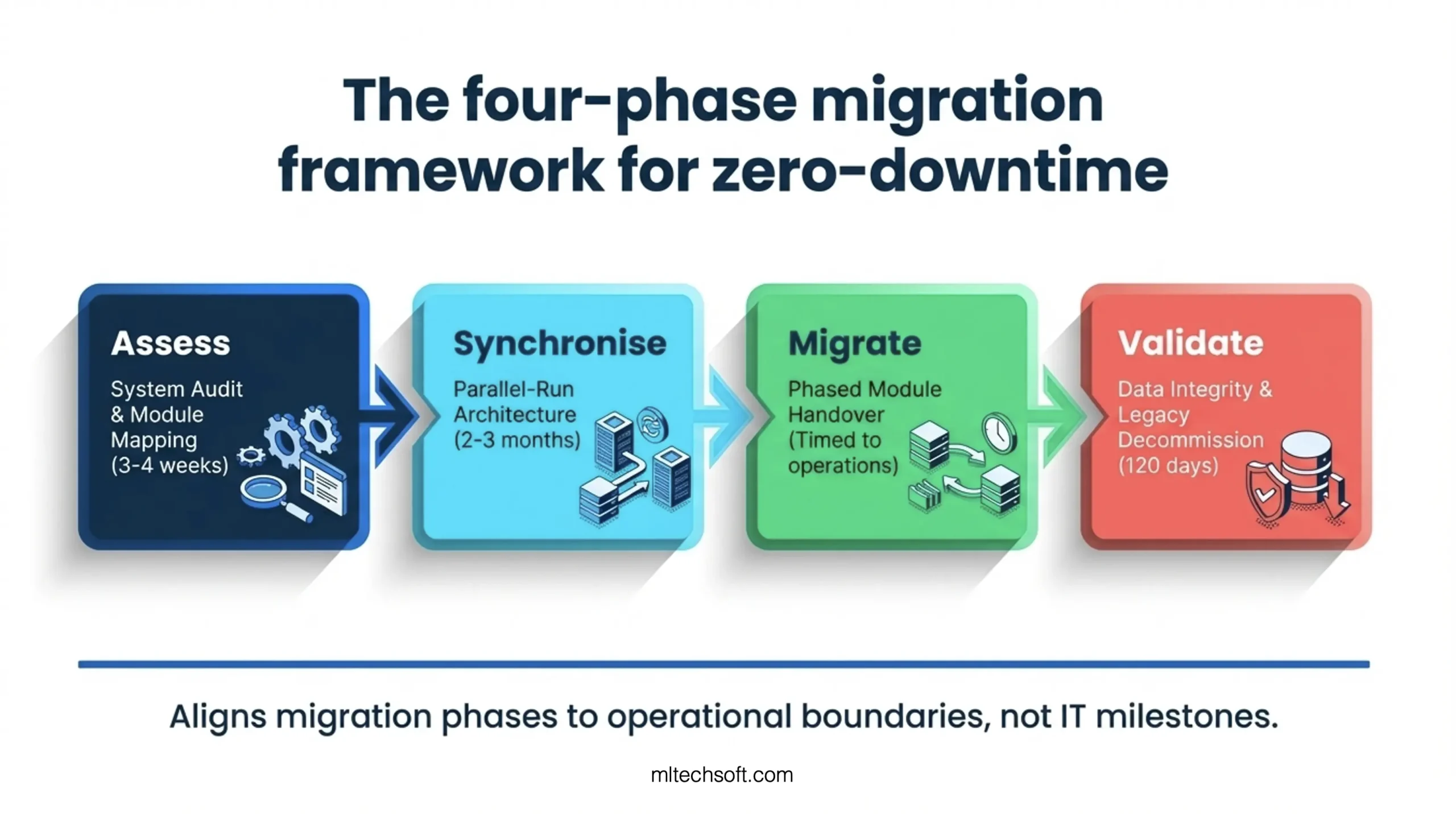
The four-phase migration framework aligns each migration phase to operational boundaries rather than IT milestones. The phases are: Assess, Synchronise, Migrate, Validate.
Phase 1 — System Audit and Module Mapping
Begin with a complete inventory of the legacy system’s modules, data flows, and operational dependencies. This is not a standard IT audit. You are mapping how operations depend on each module.
For example: “The crew management module processes three data flows: (1) sign-on/sign-off requests from the vessel, (2) certification verification from the compliance team, (3) payroll exports to finance.” Identify which flows are critical during which operational windows. Certification verification happens heavily during drydocking and port calls. Payroll exports happen monthly on a fixed schedule.
Next, map the new system’s modules to the legacy system’s modules. Are they 1:1? Usually not. The new system might have a combined “crew and personnel” module while the legacy system had separate crew and training modules. Identify gaps. What functionality in the legacy system doesn’t exist in the new system? What new capabilities does the new system have that don’t exist in the legacy system?
Finally, build a dependency matrix: which modules depend on other modules? The compliance module depends on the technical module (you can’t certify a ship if maintenance records are incomplete). The payroll module depends on the crew module (you can’t pay crew if crew records are wrong). This dependency matrix determines the sequence of module handovers.
Timeframe: 3–4 weeks.
Phase 2 — Parallel-Run Architecture (Old and New Side by Side)
This is the foundation of zero-downtime migration. Both systems run simultaneously, processing the same transactions and producing outputs that are compared for equivalence.
In practice: The new system is deployed to production and connected to the vessel fleet’s operational network, but it runs in “shadow mode.” All transactions that hit the legacy system are simultaneously processed by the new system. The outputs are logged but not used. Operational staff continue using the legacy system as normal.
For example, when a crew member signs on, the legacy system produces a sign-on certificate. At the same moment, the new system processes the same transaction and produces its own certificate. Both certificates are compared: Do they have the same certifications? The same validity dates? The same file naming convention? If they diverge, the discrepancy is logged and investigated before any crew member uses the new system’s output.
This requires Change Data Capture (CDC) infrastructure — a mechanism to automatically replicate transactions from the legacy system to the new system in near real-time. Most modern maritime software platforms support CDC, but not all legacy systems do. If your legacy system lacks CDC capability, parallel-run can be achieved through API integration or scheduled data syncs, though the latency will be slightly higher.
The advantage of parallel-run is absolute confidence. You are not making assumptions about the new system’s correctness. You are proving it, transaction by transaction.
The disadvantage is resource intensity. You are running two systems in production, maintaining dual infrastructure, and managing continuous data reconciliation. For a ship management company with 50+ vessels, this means the operations team has two sources of truth for several months. This is why the migration must be sequenced by module, not all-at-once.
Timeframe: Run in parallel for 2–3 months per module family (crew, technical, compliance). Longer parallel-runs improve confidence but increase cost.
Phase 3 — Phased Module Handover Aligned to Operational Windows
Once the new system has processed 2–3 months of shadow traffic and zero discrepancies have been found, the module is ready for handover. This is where operational windows become critical.
Start with the crew management module. Schedule the handover during a port maintenance cycle when crew changes are happening. On the scheduled date, the operational team switches from the legacy system to the new system for crew data queries and certificate generation. The legacy system is still running in parallel, but it is no longer the primary source of truth.
The crew change happens as scheduled. The crew member gets a certificate from the new system and disembarks. If the certificate is invalid or missing data, it becomes obvious immediately. If it’s correct, the module has proven itself under real operational load.
After crew management is stable (2–4 weeks with no operational issues), the technical management module is handed over during the next scheduled drydocking window. Again, the handover is timed to when the data is being actively used and verified by operational staff.
Last, the compliance module is handed over during the next compliance audit cycle.
This phased approach means each module gets 2–3 months of parallel-run validation, 2–4 weeks of operational hand-holding after cutover, and then the next module begins its cycle. The entire migration takes 12–18 months across a fleet, but there is never a moment when the business depends on an unproven system.
Comparison Table: Migration Approaches for Ship Management Systems
| Approach | Timeline | Risk | Suitable for Maritime? | Downtime Risk |
|---|---|---|---|---|
| Big-Bang Cutover | 1–2 weeks to cutover | Extremely high. All modules go live simultaneously. If something breaks, entire operations fail. | No. Maritime cannot tolerate single points of failure. | 4–48 hours typical. Unacceptable for ship management. |
| Parallel Run (All Modules) | 3–6 months | Medium-high. All modules running in parallel means dual infrastructure, complexity, and resource intensity. Rollback is easier because legacy is still live. | Partially. Resource-intensive for full parallel-run. Sequence by module instead. | Near-zero during parallel-run. But mirrors operationally risky big-bang when full cutover happens. |
| Phased Module Migration (Recommended) | 12–18 months | Low. Each module gets 2–3 months validation before handover. Handovers timed to operational windows. If a module fails post-cutover, only that module is affected. | Yes. Aligns to maritime operational rhythms. Crew/technical/compliance modules handover sequentially. | Near-zero per handover because each module is isolated. Fleet continues operating on legacy system while migration progresses. |
Timeframe per module: 4–6 months (2–3 months parallel, 2–4 weeks live operations, 1 month monitoring).
Phase 4 — Data Integrity Validation and Legacy Decommission
Once all modules have been handed over and running in production for 30+ days without critical incidents, the legacy system can be decommissioned. But not before data integrity is formally validated.
This validation is different from IT testing. You are not running automated data quality checks. You are having operational staff review data at natural operational milestones. When a vessel completes a voyage, the operational team reviews the voyage record in the new system — duration, fuel consumption, crew hours, compliance notes. Does it match reality? When a ship enters drydocking, the technical team reviews the maintenance record — is the full history there? Is it accessible?
These operational staff become data validators. They are doing their job (operating the ship, managing maintenance, ensuring compliance) and simultaneously validating the system’s data integrity.
Once 30 days have passed with no critical data issues, the legacy system can be moved to archival mode. Keep it running read-only for another 90 days (in case historical lookups are needed), then archive the database and decommission the infrastructure.
Timeframe: 30 days validation, 90 days read-only archive, decommission at month 5 post-cutover.
What to Do If Something Goes Wrong: The Rollback Protocol
The parallel-run architecture means you always have a rollback option. But rollback is only useful if you have a tested protocol.
A rollback protocol is a documented sequence of steps to stop using the new system and return to the legacy system as the primary source of truth, with zero data loss and zero operational disruption.
Here’s what a rollback protocol looks like for a crew management module:
Trigger: The new crew management system has generated incorrect sign-on certificates for two consecutive crew members at the same port.
Immediate Response (First 5 minutes): – Pause new system certificate generation. – Notify the vessel: “Use legacy system for crew change certificates until further notice.” – The crew change is delayed by 24 hours (scheduled for the next port call). – All operations revert to legacy system for crew data.
Root Cause Analysis (Hours 1–6): – Investigate the certificate error. Is it a data quality issue, a business logic bug, or a configuration error? – Determine if the issue is isolated to this vessel/port or systemic. – Can it be fixed without data loss?
Resolution Path (If fixable within 48 hours): – Fix the bug in the new system’s staging environment. – Re-run the crew change transaction through both systems. – Compare outputs. If they match the legacy system output, deploy the fix to production. – Resume new system certificate generation.
Permanent Rollback Path (If not fixable within 48 hours): – Stop all data writes to the new crew management system. – Archive the new system’s data for investigation. – All crew operations return to legacy system permanently. – Schedule a 2-week investigation to understand what went wrong. – New system handover is pushed back by 4 weeks.
The key to a successful rollback is that it happens automatically, not through manual recovery processes. The legacy system is still running in production. You are not recovering data from backups. You are simply stopping the use of the new system and resuming the old one. If the transition is clean and practiced (via test rollbacks during the 2–3 month parallel-run phase), downtime is near-zero.
Ship managers should test rollback procedures monthly during the parallel-run phase, using shadow data from non-critical vessels or test transactions. Only deploy a module to production after at least three successful rollback tests.
Case Study: How a Singapore Ship Manager Completed a Full System Migration Across Four Drydocking Seasons
A Singapore-based ship management company overseeing global fleet operations manages more than 50 vessels across multiple classes (bulk carriers, tankers, container ships). The company had been running a legacy crew and technical management system for 15 years. The platform was expensive to maintain, lacked integration with modern compliance tools, and imposed significant manual effort on the crew management team.
The company’s primary concern was operational risk. Their vessels operate on continuous schedules, with crew changes every 4–6 months and drydocking events scheduled across the fleet throughout the year. Any system downtime during active operations could delay crew changes, disrupt compliance audits, and affect port state control inspections.
Migration Timeline:
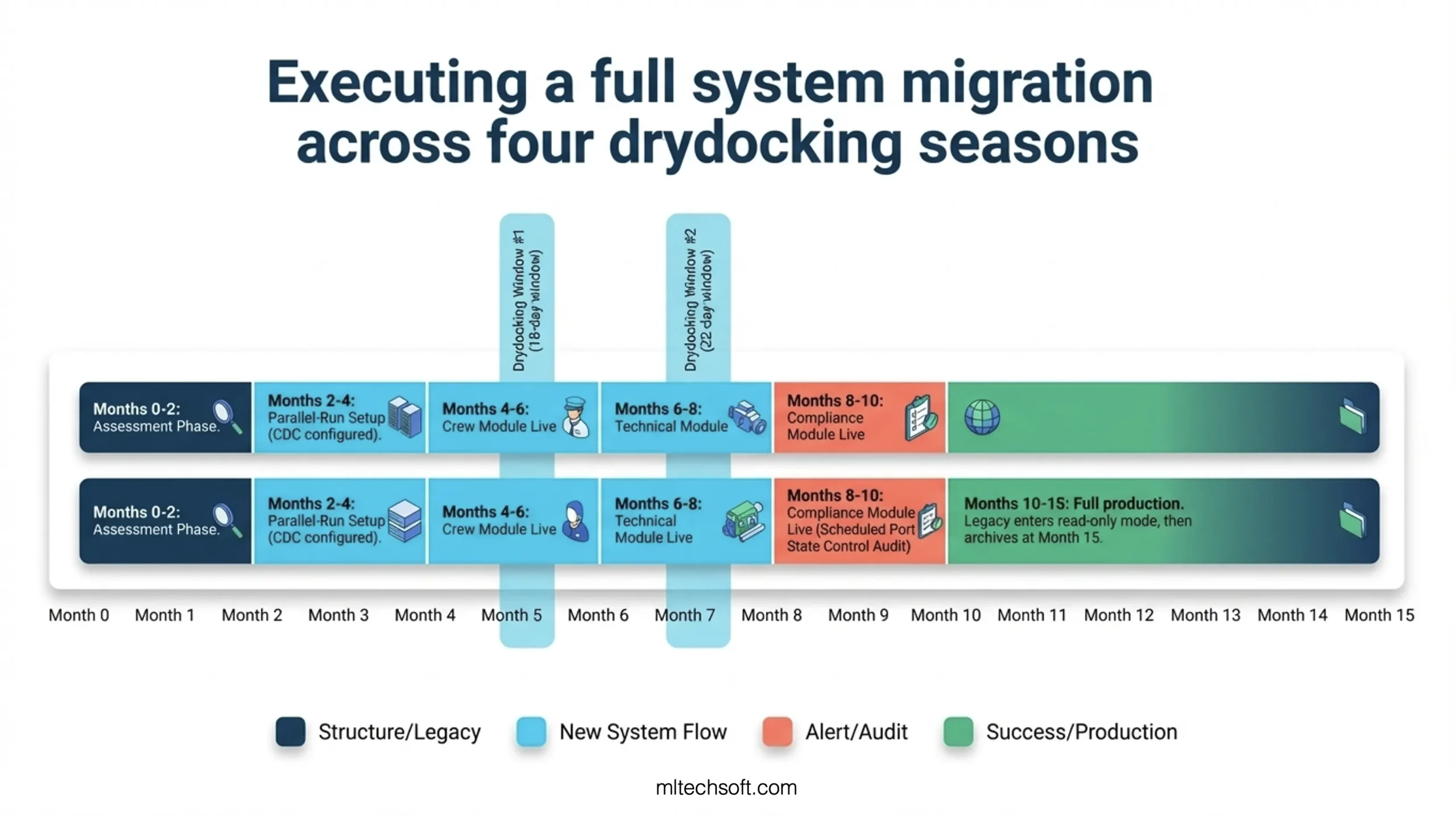
Month 0–2: Assessment Phase The company partnered with a maritime software firm to audit the legacy system’s modules, data flows, and operational dependencies. The audit identified four distinct module families: crew management, technical maintenance, compliance and audit, and vessel performance reporting. The crew management and technical modules were interdependent (you cannot close a maintenance work order if the responsible crew member is not properly certificated). The compliance module was downstream of both crew and technical (you cannot generate a port state control readiness report if either crew or maintenance data is incomplete).
Month 2–4: Parallel-Run Setup The new system was deployed to production in shadow mode. Change Data Capture (CDC) infrastructure was configured to replicate all crew and technical transactions from the legacy system to the new system in real-time. The operations team was briefed: “For the next two months, you will see two systems in your dashboard. Use the legacy system for all decisions. The new system is learning.”
Month 4–6: Crew Module Handover (Drydocking Window #1) The first drydocking event occurred in Month 5, scheduled for 18 days. Parallel-run comparison during Months 2–4 showed zero discrepancies between the legacy and new system for crew data. The company decided to go live with the crew management module during the drydocking window. Why? Because drydocking requires active crew management — crew changes, certifications, and compliance reviews are happening at high frequency. If the new system failed, the operational team would catch it immediately.
On Day 1 of drydocking, the crew management module went live. For the next 18 days, all crew change requests, certifications, and sign-on/sign-off certificates were generated by the new system. Zero issues. The vessel completed drydocking with a full crew change and all new certifications registered in the new system.
Month 6–8: Technical Module Handover (Drydocking Window #2) The second drydocking occurred in Month 7, scheduled for 22 days. Parallel-run comparison during Months 4–6 showed zero discrepancies for technical data (maintenance records, work orders, asset tracking, compliance history). The technical module was handed over during Drydocking Window #2.
The technical team reviewed every maintenance record in the new system against the physical vessel and historical records. No discrepancies. The system was declared stable.
Month 8–10: Compliance Module Handover (Port Compliance Audit) The compliance module was more tightly coupled to external regulations. Rather than a drydocking handover, the company chose to hand over the compliance module during a scheduled Port State Control (PSC) audit. The PSC inspector reviews the vessel’s compliance file — certifications, maintenance records, crew qualifications, regulatory history.
For this audit, the compliance file was pulled from the new system for the first time. The PSC inspector found zero discrepancies. The module was declared stable.
Month 10–12: Full Operational Cutover At Month 10, all three modules (crew, technical, compliance) were running in production. Drydocking Windows #3 and #4 occurred at Month 10 and Month 14, respectively. During these windows, the legacy system was tested for rollback capability, but no rollback was necessary. All operational KPIs met targets: zero crew change delays, zero compliance audit failures, zero maintenance record discrepancies.
Month 12–15: Legacy Decommission At Month 12, the legacy system was moved to read-only archival mode. Any operational staff member needing to review historical records could access the legacy system, but no new transactions were written to it. At Month 15, after 90 days of read-only access without any critical lookups, the legacy system was decommissioned and archived.
Outcome:
Total migration duration: 15 months across four drydocking windows.
Operational downtime: Zero hours.
New system-related incidents during first 6 months of production: Zero.
Cost of migration: Approximately 18% higher than a standard big-bang cutover (due to parallel-run infrastructure and extended timeline), but offset by zero unplanned downtime, zero emergency rollbacks, and zero post-cutover data recovery costs.
The company immediately reinvested the legacy system’s annual maintenance cost (approximately SGD 120,000) into developing new features in the modern platform: AI-powered crew roster optimization, real-time vessel performance analytics, and integration with Singapore’s Maritime Digital Twin ecosystem.
FAQ: Ship Management Legacy System Migration
Q: How long does a typical ship management legacy system migration take?
A: Using the phased module approach aligned to operational windows, expect 12–18 months for a fleet of 40–60 vessels. If you compress the timeline by running all modules in parallel simultaneously (not recommended), you can achieve cutover in 3–6 months, but you significantly increase the risk of operational disruption. The parallel-run phase (shadow testing) typically takes 2–3 months per module to build confidence. The handover phase takes another 2–4 weeks of intensive operational monitoring. Decommissioning takes an additional 120 days. Best practice is to accept the 12–18 month timeline in exchange for near-zero operational risk.
Q: What if we don’t have drydocking windows coming up for 6 months? Do we have to wait?
A: No. While drydocking windows are ideal for technical and compliance module handovers, crew management modules can be handed over during any scheduled port call with crew changes. Most ship managers have crew changes happening every 4–6 months, so you can begin the phased handover within 2–3 months of starting the parallel-run phase. Start with crew management during the next scheduled crew change, then wait for drydocking for the technical module. This accelerates the overall timeline without compromising safety.
Q: What is parallel-run architecture, exactly?
A: Parallel-run architecture means the new system processes the same transactions as the legacy system simultaneously, without the new system’s outputs being used for operational decisions. In practice: a crew member signs on a vessel. The legacy system receives the sign-on request and generates a certificate. At the same moment, the new system receives the same request (via Change Data Capture or API replication) and generates its own certificate. Both are compared: same data, same format, same certifications. If they match, the new system is proven correct. If they diverge, the discrepancy is investigated before anyone uses the new system. This continues for 2–3 months — thousands of transactions — until you are confident the new system is functionally equivalent to the legacy system. Then you hand over the module. The legacy system stops being the primary source of truth, but it stays running in read-only mode for 90 days, so if something goes wrong, rollback is instant.
Q: What happens if a module migration fails after go-live?
A: This is why you have a rollback protocol. If the crew management module goes live and begins generating incorrect certificates, you immediately stop using the new system and revert to the legacy system. The crew change is delayed by 24 hours. The legacy system continues operating. You investigate the issue, fix it, and schedule a new go-live date 4 weeks later. Downtime is near-zero because you never stopped using the legacy system — you just temporarily paused your use of the new system and resumed the old one. This is only possible because you maintained parallel-run infrastructure for 90+ days after the initial handover.
Q: Do we need a dedicated migration team, or can our existing staff manage this?
A: You need a hybrid approach. Your existing operations staff are essential because they understand the operational calendar, the data, and the dependencies better than any external consultant. But you also need external expertise in system architecture, Change Data Capture, and parallel-run validation — areas where maritime operations staff typically lack depth. The best structure is a small in-house migration lead (1–2 people) who coordinate with the external team, maintain the operational calendar, and manage the handover sequence. The external team handles technical infrastructure and parallel-run validation. Total dedicated staffing: 2–3 people in-house, 3–5 people from the implementation partner, for 12–18 months.
Q: How much does a migration like this cost?
A: A typical ship management legacy system migration using the phased module approach costs 15–25% more than a big-bang cutover (which typically ranges from USD 150,000–350,000 depending on system complexity and fleet size). The additional cost comes from parallel-run infrastructure (dual systems running for 3–6 months), extended timeline (12–18 months vs. 3–4 months), and the implementation partner’s expertise in maritime operations. However, this additional cost is typically offset within the first year by avoided downtime costs, post-cutover data recovery, emergency fixes, and staff overtime. A single 24-hour outage in a ship management system can cost USD 100,000–500,000 in demurrage fees, compliance violations, and operational disruption. From a business perspective, paying 20% more upfront to eliminate that risk is a clear ROI.
Q: What vendor should we choose for the new system?
A: When evaluating vendors, prioritise these qualities: (1) Experience with parallel-run migrations in maritime (not just generic IT experience). (2) Change Data Capture (CDC) infrastructure built-in, or a clear API strategy to replicate transactions. (3) References from other ship management companies who have done zero-downtime migrations. (4) A willingness to align the implementation timeline to your operational calendar, not force your operations into their project timeline. (5) ISO 27001 certification and cybersecurity credentials — increasingly important as IMO 2021 cyber risk management requirements take effect. Do not choose based on price alone. A USD 30,000 cheaper solution that goes live with a 48-hour downtime is far more expensive than a USD 30,000 more expensive solution that runs perfectly.
Conclusion
The fear of downtime is the single biggest reason ship managers delay modernising their legacy systems. But downtime is not inevitable. It is a consequence of treating system migrations as IT projects rather than operational events.
When you align a migration to the operational calendar — drydocking windows, port cycles, crew rotations, compliance audits — you transform the migration from a high-risk event into a managed sequence of controlled handovers. The parallel-run architecture means you are not trusting the new system. You are proving it, transaction by transaction, before it touches live operations. The phased module approach means if one module has an issue, the others continue running on legacy infrastructure. The rollback protocol means you always have an escape route.
This approach takes longer — 12–18 months instead of 3–4. It costs more upfront — 15–25% premium. But it eliminates the operational risk that has kept your legacy system running for 15 years despite its age and cost. A Singapore ship manager with 50+ vessels and a global fleet proved this across four drydocking seasons with zero downtime, zero data loss, and zero emergency rollbacks.
Your migration can follow the same path.
Next Steps
Request MLTech Soft’s free maritime software assessment. We’ll map your current system’s module structure against your operational calendar and deliver a zero-downtime migration roadmap — including which modules to migrate first, which operational windows to use, and what rollback protocols to have in place. The assessment includes a detailed timeline, resource plan, and cost estimate tailored to your fleet size and operational schedule.
This assessment is specifically designed for ship management companies planning legacy system modernisation. We’ll show you not just what the new system should do, but when and how it should go live without disrupting your operations.
Contact MLTech Soft for your free maritime software assessment.
Related Posts
- The Real Cost of Running Outdated Software in Ship Management — why delaying modernisation compounds operational and financial risk
- How to Evaluate a Software Development Partner for Ship Management: A CTO’s Checklist — the criteria for choosing a partner who understands maritime operations and can deliver a zero-downtime migration